¶ Admin
The pages under the admin section are for:
¶ Temp Vessels Library
Contains a list of all temp vessels created and allows users with Admin or TempVessel roles to create a new temp vessel or edit an existing temp vessel's properties. Also allows a user to create or edit a mock schedule for an existing vessel, where the user can implement any changes they want to this mock schedule for their own intended use.
¶ Customer Schedule Templates
Contains all of the templates for the customer schedules or routes that will be used in the system.
Users with Admin or CustomerSchedule roles can also create new templates or edit any information on existing templates, such as cut off dates, headers and footers, notes, and contacts.
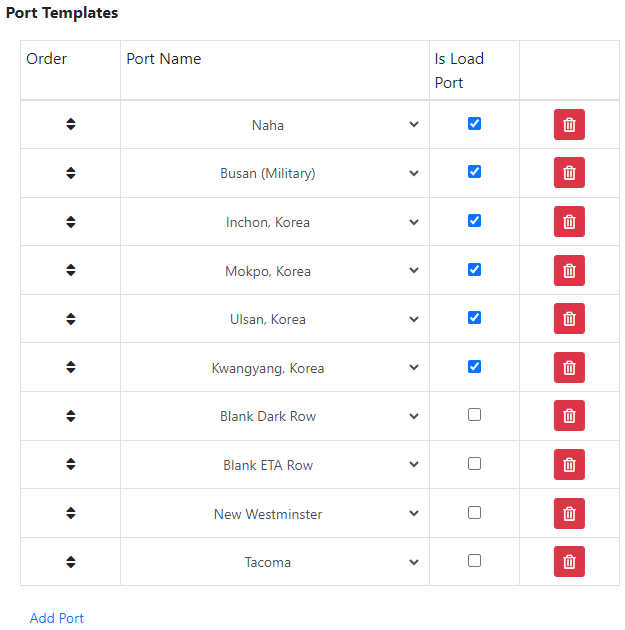
Additionally, the port templates can be edited to add or remove existing ports in the template, re-order the ports, and choose which ports are loading ports.
 |
Hold down the button and move up and down to re-order ports |
 |
Click to delete that selected port from the port template |
¶ Full Rotation Templates
Contains full rotation template that can have port calls added, edited, or deleted into the template.
*Note: See ‘Liberty Vessels’ module on how the full rotation templates are used.
¶ Transshipment Library
Contains list of transshipments that display the estimated amount of days of transshipment between two ports.
¶ Holiday Calendar
Contains list of holidays.
¶ Mafi Inventory
Contains all of the mafis along with information on where they have been and their status.
For more details on this module, click here
¶ Vessel Library
Contains all of the vessels that will be used in the vessel schedule module, with the exception of temp vessels.
¶ Port Library
Contains list of ports on the CMS.
¶ Terminal Library
Contains list of terminals and the ports that they are connected to.
¶ Vessel Tag Library
Contains list of vessel tags.
¶ Description Library
Contains all of the Port Item descriptions. It is not recommended to change any information on this table. However, it may be necessary to add new descriptions into the library.
- Note: The following descriptions are NOT editable
- Estimated Time of Arrival, Pilot on Board, Time to Berth, Working Hours, Estimated Time of Departure, Pilot Drop off
¶ Department Library
Contains list of departments. Users with the Admin role can create a new department or edit an existing department to be used in the VSM.
¶ Agent Library
Contains list of agents. Users with the Admin role can create a new agent or edit an existing agent. Additionally, there are search filters that allow users with access to this page to search for their desired agents.
¶ Mafi Type Library
Contains list of mafi types